 0800 328 1088
 Mon - Fri From 9am To 5pm




 Kodak ScanStation 730EX Plus PDF Brochure
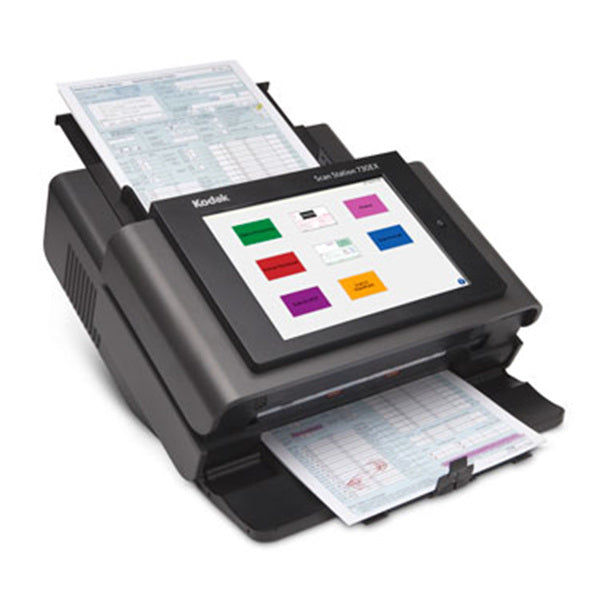
The KODAK Scan Station 730EX Plus Dedicated Network Scanner can solve unique challenges with powerful integration capabilities that can be used to produce efficiency-boosting customisations. Turn data into decisions quickly and seamlessly with simple network setup and robust remote management.
Kodak Scan Station 730EX Plus Key Features
- Remote Scanning Management
- Intuitive Interface
- Power & Security
- Easy Integration with Microsoft Ecosystem
- Fully Integrated Network Scanner
- Easy-to-navigate Touchscreen
- Integrated OCR Engine
- Built-in Barcode Reading
- Create Your Own Custom Scanning Kiosk
- Organise, and search content with improved file naming
Remote Scanning Management
Simple remote management allows you to spend less time visiting devices individually and more time on other tasks. Leveraging your existing IT infrastructure, the Scan Station connects with standard network and security protocols. It’s easy, guided configuration lets you manage large numbers of devices from wherever you need to be.
Intuitive Interface
Find the functions you need quickly with a bright, easy-to-navigate touchscreen. An intuitive, customisable touch screen makes it easy for users to navigate and simultaneously send documents to multiple destinations, scanning directly to email, file, FTP sites, or Sharepoint On Premise. And with a built-in document viewer, see your scan or even add audio memos to files before they send, all directly in the scanner
Power & Security
The Scan Station offers features like secure LDAP login and MS active directory, and functioning comparable to an MFP, including PDF Private Key Encryption and Password-protected PDF output. An integrated OCR engine lets users convert documents to text-searchable PDFs and deliver them to a variety of configurable destinations – all with a single touch on the scanner.
Easy Integration with Microsoft Ecosystem
Easily port your Windows 10 application to create a custom scanning kiosk. The Scan Station 730EX Plus is specially designed for integrators to create custom solutions. Powerful security features – such as administration-level password protection – maintain accessibility for ad-hoc users. Easy integration into the Microsoft ecosystem, plus automatic, ongoing installation of their latest security updates.
Fully Integrated Network Scanner
Take processes from multiple steps to a few by connecting the scanner directly to your network. Efficiently designed to tuck neatly into any shared work environment, the Scan Station is a fully integrated network scanner with an internal controller, so there’s no need for additional hardware or software to run.

Included Software
Smart Touch
Kodak Capture Pro Software Limited Edition
Optional Upgrade Software
Kodak Capture Pro Software
 Kodak Capture Pro Brochure

ScanStation 730 Drivers
Kodak ScanStation 730 DriversScanStation 730 Manuals
Kodak ScanStation 730 User GuideKodak 730EX Plus Warranty, Software, Accessories & Consumables
Learn More About Our Support Products ⓘ
Scanner Hire
Scanner Hire Information ⓘ
Business & Public Sector
sales@responsets.co.uk